
Far more than 95% of my personal computing is on Linux machines at this point. Yet there are still websites that completely block logins based on the browser’s user agent.
In the U.S., large banks seem to be the worst offenders.
For one, this doesn’t make your system more secure. Any malicious actor can trivially (and often does) bypass these checks with spoofed user agents. In fact, most web browsers already pretend to be each other to improve compatibility.1
I recognize that Linux use is quite a small minority (~5%) of desktop users, but this mostly ends up inconveniencing legitimate users with little to no security benefit.
Bypassing user-agent checks (Chrome)#
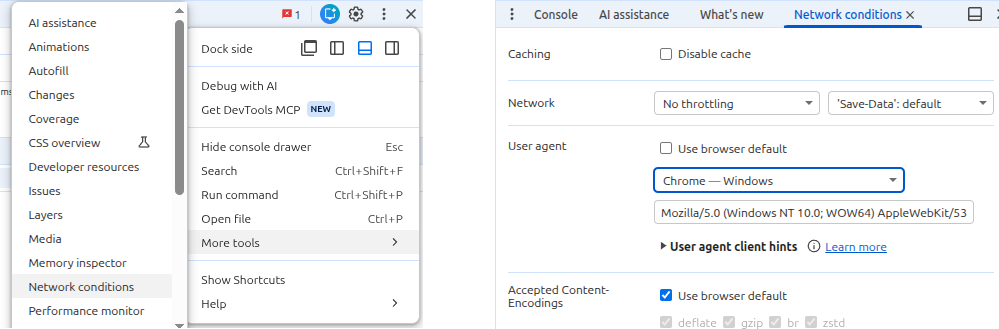
In Chrome, you can change your user agent by opening the Developer Tools (Ctrl+Shift+I), clicking the three dots menu, and navigating to the “Network conditions” tab.
Bypassing user-agent checks (Firefox)#
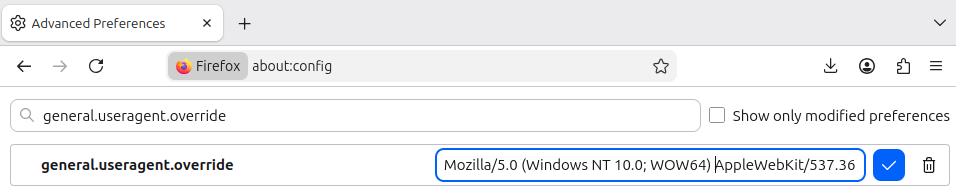
In Firefox, there are many extensions that provide the same functionality. Or you can simply:
- Navigate to the
about:configsettings - Search for
general.useragent.override - Set it to a Windows-style user agent such as
Mozilla/5.0 (Windows NT 10.0; WOW64) AppleWebKit/537.36 (KHTML, like Gecko) Chrome/146.0.0.0 Safari/537.36.
See also#
- The Wikipedia page on the User-Agent header, which includes discussion of the header’s problems, spoofing, and sniffing.
- A Hacker News comment and StackOverflow thread explaining lazy copy-paste setups that can cause this issue.